
Sourcing Guide
Packaging Barcode Proof Checklist: Barcodes, QR Codes and Small Legal Copy
September 8, 2026 | 17 min read | By ChromaPack Engineering Content
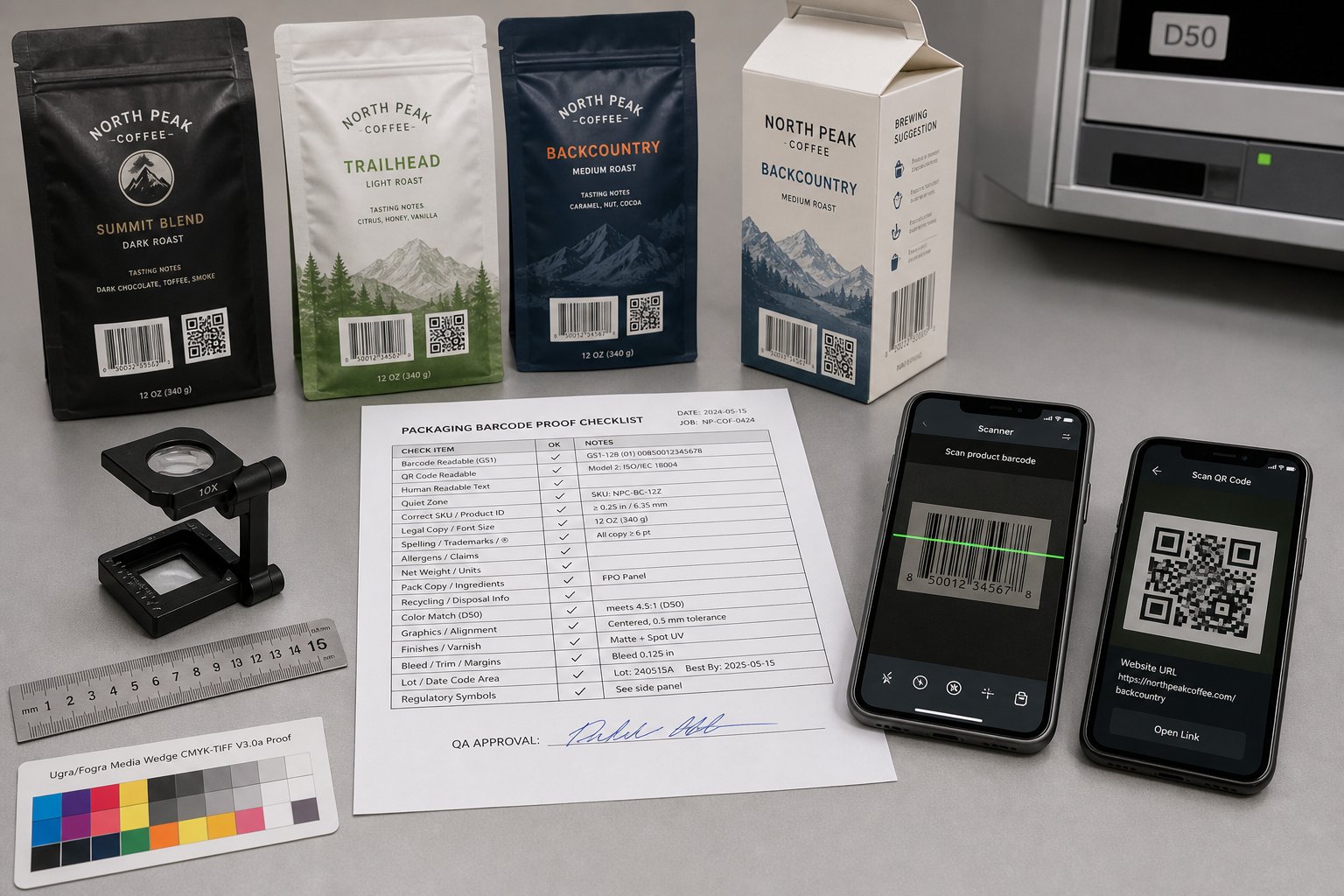
Short answer: A packaging barcode proof checklist should approve four separate things before bulk printing: the encoded data or destination, the final-size artwork geometry, the printed code on the actual formed package, and the small legal copy required for the target market.
Confirm ownership of the GTIN, URL and label text; protect the correct quiet zones and placement; print on the intended material and finish; then scan or verify representative production output and retain the signed result. A clean PDF, a screen scan or one successful phone scan cannot approve all four gates.
Release Rule
Do not release production because the code looks sharp on screen. Release only when the right data, right artwork, right physical pack and right test evidence refer to the same approved file revision and SKU.
1. Start with ownership, not artwork
Prepress can preserve a supplied code and warn about obvious production risks, but it should not silently invent a GTIN, repair regulated copy or choose where a QR code redirects. Those decisions belong to identified business, regulatory and data owners. Freeze the source information before anyone signs a visual proof.
| Object | Accountable owner | Approval record | | :--- | :--- | :--- | | Retail barcode data | Brand/data owner or authorized GS1 licensee | GTIN, symbology/application, check digit, SKU mapping, human-readable digits and market/customer requirements. | | QR destination | Brand digital/product owner | Final encoded payload, HTTPS URL, static/dynamic service, redirect chain, landing-page owner, expiry and fallback plan. | | Legal or regulated copy | Brand regulatory/legal owner | Exact approved text, language, placement, market, product category, minimum prominence/type rules and revision. | | Print geometry | Designer/prepress plus production | Final dimensions, quiet zones, bar/module construction, trapping, knockout, color, substrate and finish limitations. | | Physical performance | QA plus business user | Representative samples, intended scanners/devices, verifier rule where required, acceptance sampling and retained evidence. | | Production release | Authorized brand buyer and factory owner | One file revision, SKU/component scope, deviations, signatures, date and reapproval triggers. |
Control point: If a supplied barcode decodes to the wrong item or a QR code opens the wrong page, crisp printing will reproduce the error efficiently. Record the source data and owner approval before judging appearance.
2. The 18-point packaging proof checklist
Use this checklist as your final gate before production release.
| Gate | What the buyer must confirm | | :--- | :--- | | 01. SKU and market | The code and copy are assigned to the correct product, variant, component, language and destination market. | | 02. Artwork revision | The filename, revision/date and dieline version match the approved production order. | | 03. Data authority | The GTIN, encoded payload and legal-copy master come from named authorized owners. | | 04. Symbology | The selected barcode or 2D carrier fits the retailer, channel, use case and current application standard. | | 05. Check digit/data | Barcode digits, check digit, Application Identifiers or other syntax are validated where applicable. | | 06. Human-readable text | Digits and labels below or beside the symbol match the encoded data and approved formatting. | | 07. Final size | Bar width/X-dimension, height, QR module size and total symbol area are checked at 100% output—not from a zoomed screen. | | 08. Quiet zone | Required blank margins are preserved for the exact symbology; no text, border, texture, foil or dieline enters them. | | 09. Color/contrast | The production color combination, opacity and reflectance are suitable for the intended scanning system. | | 10. Placement | The symbol avoids folds, edges, seams, zippers, gussets, seals, strong curves and obscuring wraps. | | 11. Orientation | The orientation suits forming, filling, point-of-sale or logistics handling and scanner presentation. | | 12. Substrate | The actual paper, kraft, film, clear label, metallic area or recycled texture is represented in testing. | | 13. Finishing | Lamination, varnish, foil, embossing, white ink and surface gloss are included in the physical review. | | 14. QR destination | The final printed payload resolves through redirects to the correct secure, mobile-ready destination. | | 15. Small copy content | Spelling, ingredients, warnings, claims, units, addresses, languages and version are approved by the brand owner. | | 16. Small copy reproduction | Actual-size positive/reverse text and fine rules remain readable after the intended print and finish. | | 17. Physical test | Representative formed samples are tested with the intended phone, retail, warehouse or verification route. | | 18. Evidence and release | Results, sample IDs, exceptions, reviewers and reapproval triggers are retained against the order. |
3. Check a retail barcode as a measured symbol
A retail barcode is not a decorative group of lines. Its symbology, encoded data, dimensions, quiet zones, bar height, contrast and position form one machine-readable object. GS1 advises checking the check digit, quiet zones, contrast, colors, construction, symbol size, bar height, packaging interference, damage and position.
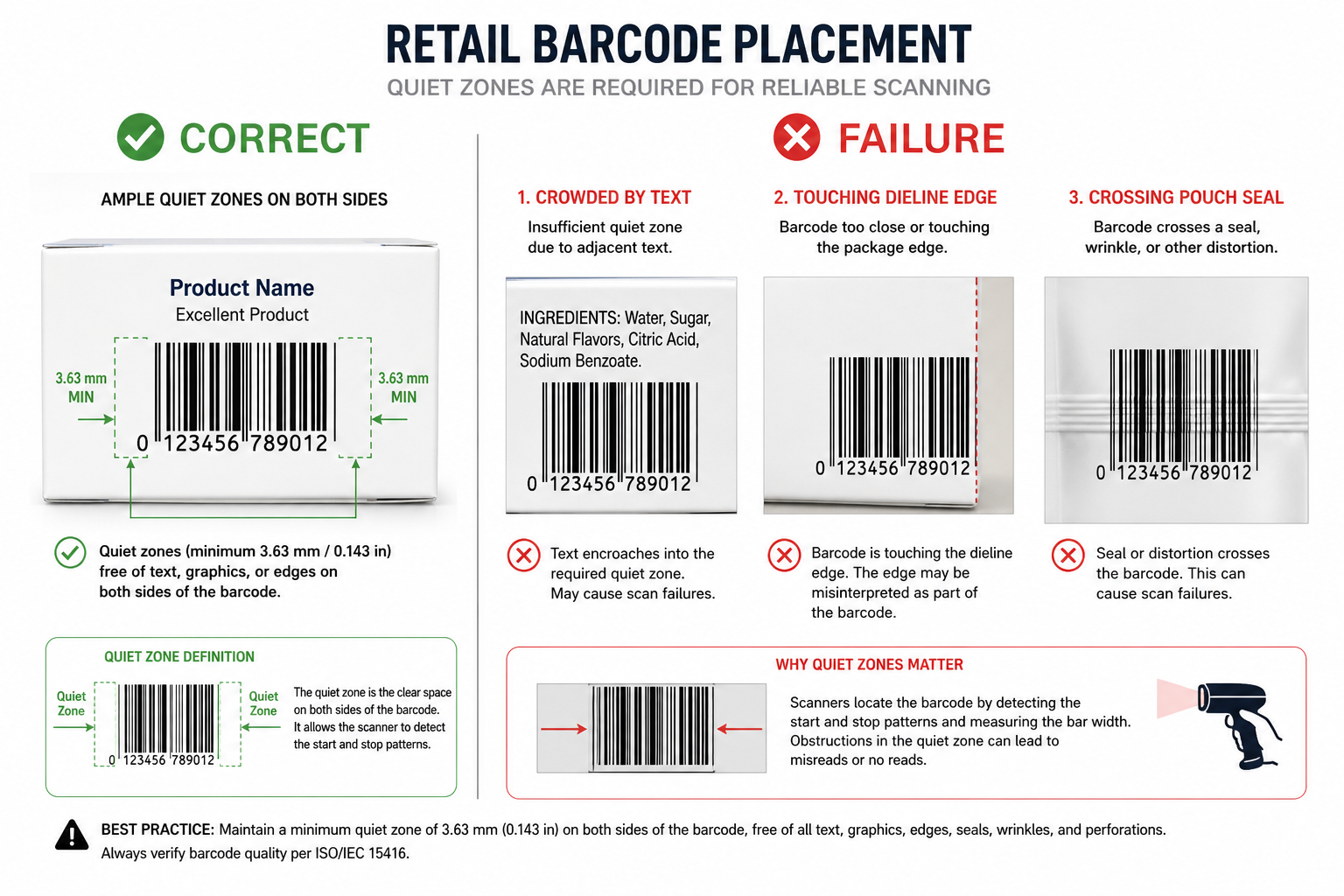
Barcode control checklist:
- Correct data: Decode the final file and compare the result with the authorized SKU/GTIN register.
- Quiet zones: Measure the symbology-specific clear areas in the final artwork and printed pack; a white rectangle alone is not proof if another layer or finish intrudes.
- Dimensions: Record magnification or X-dimension, width and height. Avoid casual bar-height truncation to make room for copy.
- Optical behavior: Evaluate actual inks, background, white ink, opacity, gloss and reflectance—not only visual contrast on a monitor.
Where a verifier grade or retailer report is required, define the standard, aperture/wavelength, minimum grade, sample plan and report retention. Review our printing and prepress capabilities to confirm the matching equipment for your job.
4. Treat a QR code as both a printed symbol and a live service
A QR code can print perfectly and still fail the project because the destination is wrong, slow, expired or unmanaged. DENSO WAVE's QR Code guidance defines the quiet zone as a clear margin four modules wide on all sides.
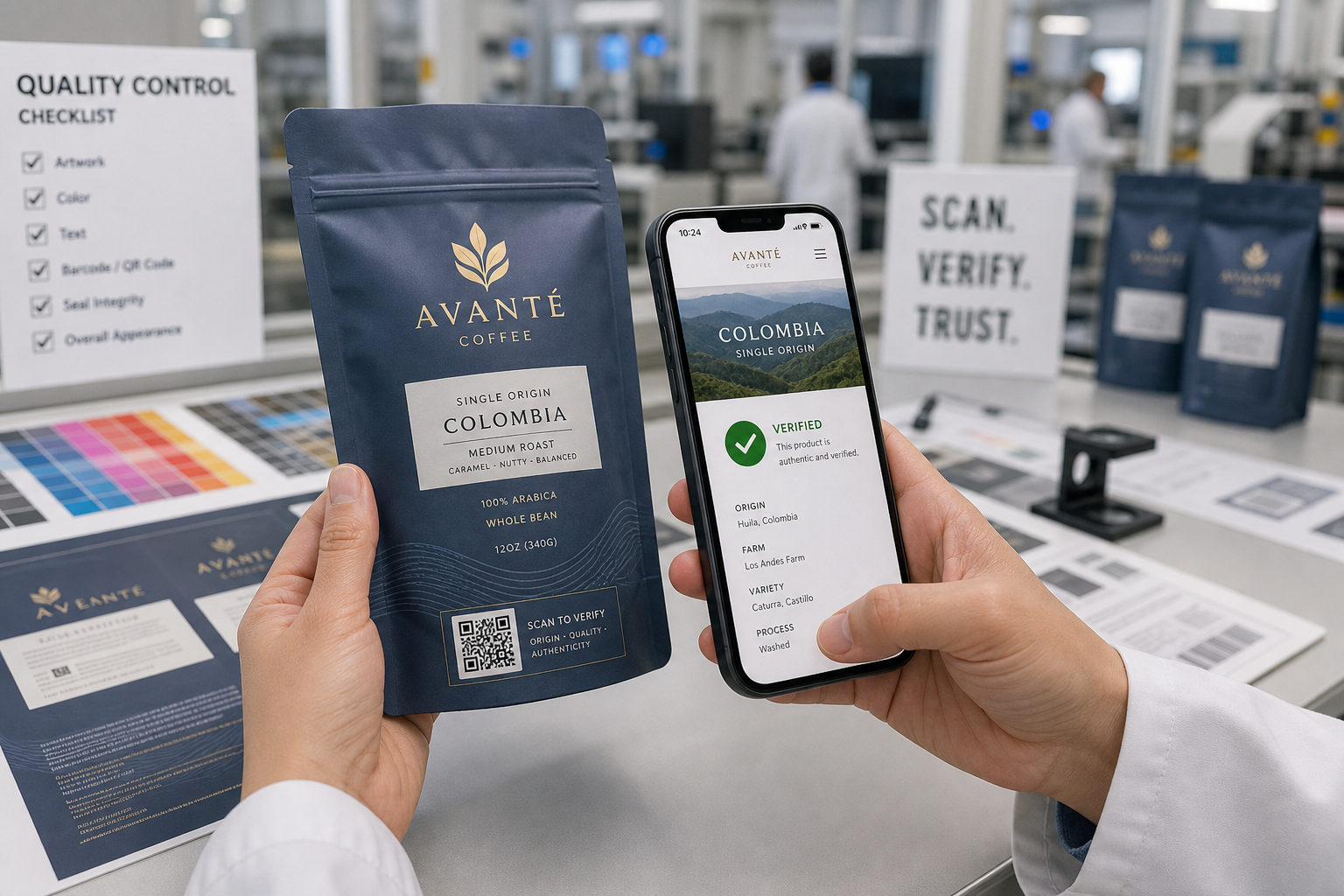
QR control approval questions:
- Ownership: Name the owner of the domain, redirect or dynamic-code account; document renewal, access and fallback responsibility.
- Destination: Test the final HTTPS path, redirects, mobile rendering, geographic behavior, language, consent flow and intended action.
- Module and quiet zone: Measure at final output size and protect the four-module QR margin on all sides.
- Physical environment: Test the actual substrate, white backing, print process, finish, curvature, forming and normal handling damage.
5. Place the code for the formed package, not the flat dieline
The code may sit on a flat, quiet panel in the artwork while production converts that panel into a curve, gusset, crimp, fold or overlap. Review the code after printing, finishing, forming, filling or application to the extent those steps can change the reading condition.
- Folding carton: Keep the code away from scores, corners, and seams. Review custom printed boxes for carton-specific placement.
- Flexible pouch: Avoid zipper tracks, heat seals, and gusset folds. Review custom flexible pouches for laminate-placement rules.
- Bottle or jar label: Limit curvature across the symbol and control application skew. Review custom labels and stickers for roll-label orientation.
6. Separate legal compliance from printability
“Small legal copy” is not one universal category. The brand's regulatory owner must approve what the package says, where it appears and any minimum type or prominence rule. The printer must then confirm whether the approved content can be reproduced legibly.
FDA's labeling guides give specific type-size methods for certain declarations, but these do not automatically apply to every product or market. Use the current regulation and qualified review for the exact product.
Do not solve a fit problem by silent reduction. If approved copy does not fit, stop and return the conflict to the regulatory owner. The printer should not delete, abbreviate or shrink regulated content without authorization.
7. Know what each proof can approve
| Evidence | Can support | Cannot prove by itself | | :--- | :--- | :--- | | On-screen PDF | Text, data labels, artwork layers, rough placement. | Physical size, optical contrast, reflectance, curvature, or production scan performance. | | Office print at 100% | Crowding, text fit and early phone-scan screening. | Production ink/substrate behavior or barcode verifier grade. | | Contract proof | Color/layout direction and final-size review. | A different bulk print route unless comparability is established. | | Representative sample | Material, finish, formation, legal-copy reproduction. | Lot-wide conformity without an approved sampling plan. | | First-off / press sample | Early production output against the standard. | The entire run unless controls maintain the result. |
8. Build a risk-based physical scan matrix
A phone camera is appropriate for a consumer QR journey; it is not a substitute for a point-of-sale, warehouse or formal verification requirement.
- Consumer QR: Test on indoor light, oblique angle, and filled/formed pack.
- Retail POS: Test intended orientation, checkout presentation, and final production package.
- Formal barcode quality: Use a calibrated verifier and current applicable GS1/ISO method.
9. Replace “looks good” with a color and barcode approval record
Record the following in your quality file for every production order:
- Files: Final artwork filename/revision and approved PDF controlled ID.
- Barcode: Symbology, authorized data source, decoded value, dimensions/quiet zones, and verifier requirement.
- QR: Exact payload, destination owner, redirects, and test environment.
- Legal copy: Approved text master/revision, regulatory reviewer, and applicable type rule.
- Release: Approved scope, signatures/date, and retained-sample location.
10. Copyable Production Instruction (RFQ/PO)
"Produce packaging component [name/SKU] from controlled artwork [filename/revision] using [material/construction], [print process] and [finish]. Preserve supplied [barcode symbology] data and required symbol dimensions, quiet zones and placement according to [applicable GS1/customer specification]. Preserve the supplied QR payload [controlled reference] and its four-module quiet zone. Do not redraw, rescale, replace, redirect or alter regulated copy without written approval. Submit [proof/sample type] for final-size review. Bulk release requires [consumer-device/POS/logistics/verifier] tests under [conditions and acceptance rule], plus actual-size legal-copy review. Retain results, approved sample ID and deviations. Notify the buyer before any artwork, data, material, print, finish, forming or placement change."
Frequently Asked Questions
Can I approve a barcode by scanning the PDF on my phone? No. That checks only whether one device can decode a screen rendering. It does not prove final size, printed contrast, quiet zones, reflectance, placement, forming or retail-system performance.
How much quiet zone does a QR code need? DENSO WAVE specifies a clear margin four modules wide on all four sides. The module size and total symbol area still need to suit the payload, print process and use distance.
Can I put a logo inside a QR code? It may be technically possible, but the exact modification changes risk. Generate and test the final artwork on the production package; do not assume error correction guarantees success.
Ready to Review Your Final Artwork?
To get an accurate production review, submit your final artwork for review including:
- Packaging format and dimensions.
- Final dieline and artwork revisions.
- Authorized barcode data and symbology requirements.
- Exact QR payload and destination owner.
- Approved legal-copy master and target market.
Authoritative Sources
- GS1: 2D Barcodes at Retail Point-of-Sale Implementation Guideline
- DENSO WAVE: QR Code quiet zone guidance
- ISO/IEC 15416:2025: Linear barcode print quality standard
- FDA: Cosmetics Labeling Guide & Food Labeling Guide